

here ya go as img /img
One Item for BM a Day (2010-2012)
Got a creative bone today....here is what came of it (keep in mind that I have never been an artsy-crafty person!)

They are denim lunch sacks with a cute little handle and Velcro closes. Left over from an old craft project of my daughters! Thinking they will make someone happy.
They are denim lunch sacks with a cute little handle and Velcro closes. Left over from an old craft project of my daughters! Thinking they will make someone happy.
Find out what I am up to: http://plumeriasworld.blogspot.com
2010: Pink Heart Camp
2010: Pink Heart Camp


That's not an image. Images are indicated by ending with ".jpg" or ".gif."jella wrote:
here ya go as img /img
If it doesn't end in that, it won't work. Because it isn't an image. It's just a link to a webpage.
I use tinypic.com, when I need to upload something to share. Easy and quick, nothing to sign up for.

...if you uploaded the photo from your computer into Tinypic.com, it would have given you a couple of choices after it formatted it.
Including one you could copy and paste right into here, looks like

Repeat: if it doesn't end in .jpg or .gif, you cannot post it here as an image - cuz it ain't one!
Also, URL will link to a web address. It will not show an image (an image being a link that ends with .jpg or .gif).
(and I can't get on FB here to save whatever it is, reload it and post it here)
So, you go to tinypic.com. Click on "browse." Double-click the picture on your computer you want to use. Click the big green UPLOAD NOW! button.
Complete the captcha and click UPLOAD NOW! again.
You get this:
http://tinypic.com/?t=postupload
Second option is the one you want, to do this

ETA: Ok, the post upload link just takes you to the main page, but still.I just uploaded that pic there, to write out the step-by-step...

-
DoctorIknow
- Posts: 864
- Joined: Thu Aug 26, 2004 3:07 pm
- Burning Since: 1998
- Camp Name: Camp Do Nothing
- Location: Thailand/Sacramento
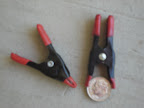
I take hundreds of the clamps in the first, smaller picture. They make great gifts for neighboring campers.
They are way strong (trust me...these are not for nipples!) Much stronger than the larger (about 3-4") cheap plastic clamps, the "jaws" of which always fall off.
Put camo or netting over a 1/8" or 1/4" line and clamp it and it will not come undone even in high winds. If the line is thicker, just clamp the fabric to itself. Also great for closing bags, especially food. Or hang stuff from ceiling of tent by just clamping on the tent frabric. The inside of my tent is 100% covered in sari cloth held on with these clamps.....1001 uses.
Unfortunately, I've only found them, for about $3 for a dozen, at the Denios Flea Market in Roseville, CA
http://www.denios.org If anyone knows where to get them online, let us all know. I've found 2" (50mm) metal spring clamps similar to the one pictured with the dime in the jaws, but are way too expensive and none are painted and would become a corroded mess...
Avoid the 3"plastic clamps in the picture below: jaws will fall off and they have no power:

They are way strong (trust me...these are not for nipples!) Much stronger than the larger (about 3-4") cheap plastic clamps, the "jaws" of which always fall off.
Put camo or netting over a 1/8" or 1/4" line and clamp it and it will not come undone even in high winds. If the line is thicker, just clamp the fabric to itself. Also great for closing bags, especially food. Or hang stuff from ceiling of tent by just clamping on the tent frabric. The inside of my tent is 100% covered in sari cloth held on with these clamps.....1001 uses.
Unfortunately, I've only found them, for about $3 for a dozen, at the Denios Flea Market in Roseville, CA
http://www.denios.org If anyone knows where to get them online, let us all know. I've found 2" (50mm) metal spring clamps similar to the one pictured with the dime in the jaws, but are way too expensive and none are painted and would become a corroded mess...
Avoid the 3"plastic clamps in the picture below: jaws will fall off and they have no power:


-
jella

- Posts: 1823
- Joined: Thu Nov 12, 2009 9:01 pm
- Burning Since: 2009
- Camp Name: Dye with dignity
- Location: Escondido, California
Very cool..I gotta find you guys and see this thing  All you need is a gypsy Vanner to pull it
hey I learned a neat trick there's a website called tinypic.com you download urls there from your pc do the paste and it will show the pic without referring to your facebook
All you need is a gypsy Vanner to pull ithey I learned a neat trick there's a website called tinypic.com you download urls there from your pc do the paste and it will show the pic without referring to your facebook
Burning Man isn't about the stuff you see when you get there ....it's about the people that brought that stuff there

-
DoctorIknow
- Posts: 864
- Joined: Thu Aug 26, 2004 3:07 pm
- Burning Since: 1998
- Camp Name: Camp Do Nothing
- Location: Thailand/Sacramento
Sounds like the FaceBook or tinypic method is lengthy, not efficient, etc..... especially with those damn Captcha's.
Download Picasa, free from Google ( http://picasa.google.com/thanks.html ). It will find every image on your computer, without moving them, and you can upload images to a Picasa Web Album, choosing the size of your choice.
You will have to have a Google "account" but you need not sign up for gmail or anything else.
You will also need to set up a Picasa Web Album.
So, here's what to do:
1-Upload pic from Picasa (program on your computer) to Picasa Web Albums (this is what the bottom of the screen will look like in Picasa once you've double clicked your image. This puts you in Edit mode, where you can crop or do normal pic editing tasks. Choose the upload folder to the far left of the stuff on the bottom of the screen.)

2-You can now use an existing folder on Picasa Web Albums, or make a new one. Choose the size to upload (once uploaded, you can change the size for embedding in the eplaya), choose the Visibility (public in this case) and hit the Upload button:

3-Now you pick the "View Online". If your image is huge, make sure the Conserve Bandwidth button is checked, as you only have 1GB free space.

4-Now, you will click "Link to this Photo" (In this same window, you can add captions to the photo":

5-This step is the most important.
----Check the box "Image only (no link)"
----Select size. (if you post in eplaya and it's too big or too small, go back to the Picasa Web Album and select another size. For this reason, keep the Picasa Web Album open in your browser)
----Highlight and copy the http address in the "Embed image" box

6-Back in eplaya "Reply" window:
-----DESELECT the Disable HTML and Disable BBCode boxes
-----Select the "Img" box. If you hit it once, you will get at the end of the HTML link.
-----Or, hit the "Img" button twice and you'll get both together and you can paste in between them.
----After you've pasted, the link should look exactly like the screensave below

7- Click the Preview box (next to the Submit box) and see if your image is the right size. Correct in Picasa Web Albums as in step 5.
Good LUCK![/img]
Download Picasa, free from Google ( http://picasa.google.com/thanks.html ). It will find every image on your computer, without moving them, and you can upload images to a Picasa Web Album, choosing the size of your choice.
You will have to have a Google "account" but you need not sign up for gmail or anything else.
You will also need to set up a Picasa Web Album.
So, here's what to do:
1-Upload pic from Picasa (program on your computer) to Picasa Web Albums (this is what the bottom of the screen will look like in Picasa once you've double clicked your image. This puts you in Edit mode, where you can crop or do normal pic editing tasks. Choose the upload folder to the far left of the stuff on the bottom of the screen.)
2-You can now use an existing folder on Picasa Web Albums, or make a new one. Choose the size to upload (once uploaded, you can change the size for embedding in the eplaya), choose the Visibility (public in this case) and hit the Upload button:
3-Now you pick the "View Online". If your image is huge, make sure the Conserve Bandwidth button is checked, as you only have 1GB free space.
4-Now, you will click "Link to this Photo" (In this same window, you can add captions to the photo":
5-This step is the most important.
----Check the box "Image only (no link)"
----Select size. (if you post in eplaya and it's too big or too small, go back to the Picasa Web Album and select another size. For this reason, keep the Picasa Web Album open in your browser)
----Highlight and copy the http address in the "Embed image" box
6-Back in eplaya "Reply" window:
-----DESELECT the Disable HTML and Disable BBCode boxes
-----Select the "Img" box. If you hit it once, you will get
-----Or, hit the "Img" button twice and you'll get both together and you can paste in between them.
----After you've pasted, the link should look exactly like the screensave below
7- Click the Preview box (next to the Submit box) and see if your image is the right size. Correct in Picasa Web Albums as in step 5.
Good LUCK![/img]
-
bm_cricket

- Posts: 756
- Joined: Sun Dec 21, 2008 10:06 pm
- Burning Since: 2008
- Location: My mind is on the road to BRC
I finally finished taking all my photos off my flash media in prep for using it again this summer? Productive day?
I didn't even take that many pictures either... somehow I realized that the only people who would believe me about the stuff out there were there themselves and I don't need to show those people pictures. And if they weren't there they wouldn't believe me with or without pictures so ... I'm not really sure why I even took a camera...
PS: I would never shirt cock because my camera has an uncomfortably large lens.
I didn't even take that many pictures either... somehow I realized that the only people who would believe me about the stuff out there were there themselves and I don't need to show those people pictures. And if they weren't there they wouldn't believe me with or without pictures so ... I'm not really sure why I even took a camera...
PS: I would never shirt cock because my camera has an uncomfortably large lens.
It was better next year. -Burners
-
Fire_Moose

- Posts: 2488
- Joined: Wed Jul 16, 2008 9:40 am
- Location: Scottsdale, AZ
- Contact:


-
EmilyD

- Posts: 1168
- Joined: Tue Feb 23, 2010 3:03 pm
- Burning Since: 2010
- Camp Name: Art Car Camp
- Location: SF Bay Area
- Contact:
Shade Structure Dilema Solved!!!
After months of worrying, designing and re-designing our own structure, as well as getting help from an experienced friend, (he's built shade structures for really large camps over the years) we were lucky to order a pre-designed, Playa-tested, reasonably priced, kit that will work over our 9' 6" trailer. Our friend found it at the Maker Faire in San Mateo, CA this weekend and I ordered it to get in on one of the last batches the artist (John Sarriugarte - Golden Mean snail car, Form & Reform, etc.) is going to produce before this year's Burning Man. If you're interested you can check his website for details. The awnings have to be picked up from him in person, no shipping. Although I won't be fully relieved until we have ours in hand, put it up and confirm it works over our peak-roofed trailer, I'm much less stressed about this critical issue for our burgin voyage to the Playa.
John's Website: http://www.formandreform.com/wordpress/?page_id=2576
John's Website: http://www.formandreform.com/wordpress/?page_id=2576
You don't have to be skinny, naked and under 30 to be a Hottie!

-
theCryptofishist

- Posts: 40312
- Joined: Mon Feb 23, 2004 9:28 am
- Burning Since: 2017
- Location: In Exile
That's a metaphor, isn't it?bm_cricket wrote:PS: I would never shirt cock because my camera has an uncomfortably large lens.
The Lady with a Lamprey
"The powerful are exploiting people, art and ideas, and this leads to us plebes debating how to best ration ice.
Man, no wonder they always win....." Lonesomebri
"The powerful are exploiting people, art and ideas, and this leads to us plebes debating how to best ration ice.
Man, no wonder they always win....." Lonesomebri